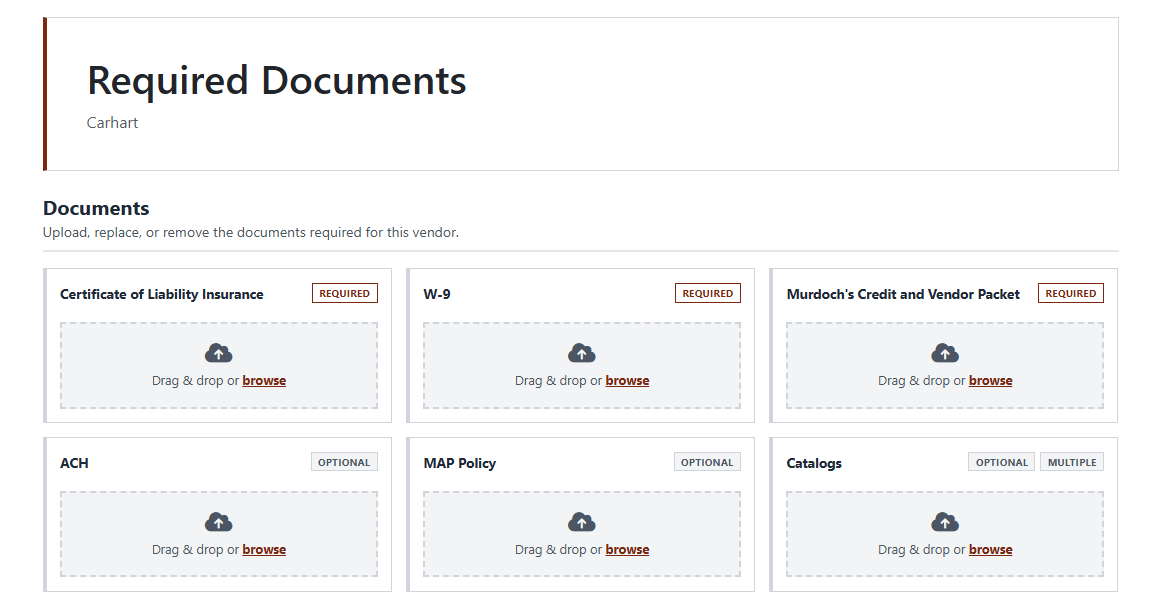
What this page does
Provides drag-and-drop upload for every file Murdoch’s needs on record for the vendor. Required documents must be present before a vendor can be marked Active during onboarding — see Onboarding a New Vendor. Who can edit: Employees in the Murdochs: Purchasing group, plus the vendor themselves on their own portal. See Roles & Permissions.Document types
Uploading a file
1
Locate the correct card
Each document type has its own card. Match the file you’re uploading to the right card — the system does not automatically detect document type.
2
Drag or browse
Drop a file onto the card, or click browse to open a file picker. Accepted formats: PDF, PNG, JPG, DOCX.
3
Verify the upload
Once uploaded, the card shows the file name and upload date. Click the file name to download it and confirm the correct version was uploaded.
Replacing or removing
- Replace — upload a new file to a card that already has one. The old file is archived and the new one becomes current.
- Remove — use the delete icon on the card. Removal is not allowed for Required documents on active vendors.